ℹ️ Note
This PR body was truncated due to platform limits.
This PR contains the following updates:
| Package | Change | Age | Adoption | Passing | Confidence | Type | Update |
|---|---|---|---|---|---|---|---|
| @vscode/vsce (source) | ^3.7.2-9 → ^3.7.2-12 | devDependencies | patch | ||||
| home-lang/pantry | v0.8.16 → v0.9.19 | action | minor | ||||
| oven-sh/setup-bun | v2.1.3 → v2.2.0 | action | minor | ||||
| vscode | ^1.85.0 → ^1.113.0 | engines | minor |
Release Notes
Microsoft/vsce (@​vscode/vsce)
v3.7.2-12
Changes:
- #1255: Bump brace-expansion
This list of changes was auto generated.
v3.7.2-11
Changes:
- #1253: Bump picomatch from 2.3.1 to 2.3.2
This list of changes was auto generated.
v3.7.2-10
Changes:
- #1252: Bump yauzl from 2.10.0 to 3.2.1
This list of changes was auto generated.
home-lang/pantry (home-lang/pantry)
v0.9.19
v0.9.18
v0.9.17
v0.9.16
v0.9.15
feat: TS installer SDK for system packages
v0.9.14
fix: Windows zig install via action's Node.js APIs
v0.9.13
v0.9.12
fix: Windows zig PATH, .exe detection, install dir PATH
v0.9.11
feat: full Windows zig support, zip extraction, .exe handling
v0.9.10
fix: route zig to ziglang.org, chmod +x after extraction, bun.sh support
v0.9.9
fix: route zig packages directly to ziglang.org download
v0.9.8
Fix: stream tarballs from S3 via registry (no redirect, no buffering). Native Zig HTTP for all downloads.
v0.9.7
Fix: install missing deps on cache hit, S3 redirect for tarballs, add release:patch script
v0.9.6
Fix: tarball downloads via registry now 302-redirect to S3 (no more proxy buffering/hangs). Analytics tracked before redirect. Native Zig HTTP client works properly.
v0.9.5
Fix: use registry.pantry.dev for all package downloads (fixes S3 access denied errors). Includes pantry upgrade command.
v0.9.4
v0.9.3
v0.9.2
v0.9.1
v0.9.0
v0.8.18
v0.8.17
oven-sh/setup-bun (oven-sh/setup-bun)
v2.2.0
oven-sh/setup-bun is the github action for setting up Bun.
What's Changed
- build: update action runtime to Node.js 24 by @adam0white in #176
- ci: use
actions/checkout@v6.0.2in the test workflow by @tcely in #173 - ci: update actions for the
autofix.ciworkflow by @tcely in #174 - ci: update actions for the
Release new action versionworkflow by @tcely in #175 - release: v2.2.0 by @xhyrom in #177
New Contributors
- @adam0white made their first contribution in #176
- @tcely made their first contribution in #173
Full Changelog: https://github.com/oven-sh/setup-bun/compare/v2...v2.2.0
microsoft/vscode (vscode)
v1.113.0
https://code.visualstudio.com/updates/v1_113
v1.112.0
https://code.visualstudio.com/updates/v1_112
v1.111.0: March 2026 (version 1.111)
Welcome to the 1.111 release of Visual Studio Code, the first of our weekly Stable releases! This release further enhances the agent experience with agent permissions, agent-scoped hooks, easier agent debugging and troubleshooting, and more.
Happy Coding!
v1.110.1: February 2026 Recovery 1
The update addresses these issues.
For the complete release notes go to Updates on code.visualstudio.com.
v1.109.5: January 2026 Recovery 5
The update addresses these issues .
For the complete release notes go to Updates on code.visualstudio.com.
v1.109.4
v1.109.2: January 2026 Recovery 2
The update addresses these issues.
For the complete release notes go to Updates on code.visualstudio.com.
v1.109.1: January 2026 Recovery 1
The update addresses these issues, including a fix for a security vulnerability.
For the complete release notes go to Updates on code.visualstudio.com.
v1.109.0: January 2026
Welcome to the January 2026 release of Visual Studio Code. In this release, we are further evolving VS Code to make it the home for multi-agent development.
Chat UX: chat just feels better and snappier with faster streaming, improved reasoning results, and a revamped editor inline chat
Agent Session Management: it's now easier to delegate tasks to agents across local, background, and cloud and jump in when needed
Agent Customization: build your own workflows using agent orchestrations, and have consistent results with Agent Skills and organization-wide customizations
Agent Extensibility: reuse your knowledge with Claude agent support and new Anthropic model capabilities, and enjoy rich chat interactions with MCP Apps
Agent Optimizations: agents work smarter with Copilot Memory and experience faster code search with external indexing
Agent Security & Trust: feel confident running terminal commands with sandboxing and effective auto-approval rules
Workbench & productivity: test your apps without leaving the editor with the new integrated browser
v1.108.2: December 2025 Recovery 2
The update addresses these issues.
For the complete release notes go to Updates on code.visualstudio.com.
v1.108.1: December 2025 Recovery 1
The update addresses these issues.
For the complete release notes go to Updates on code.visualstudio.com.
v1.108.0: December 2025
Welcome to the December 2025 release of Visual Studio Code.
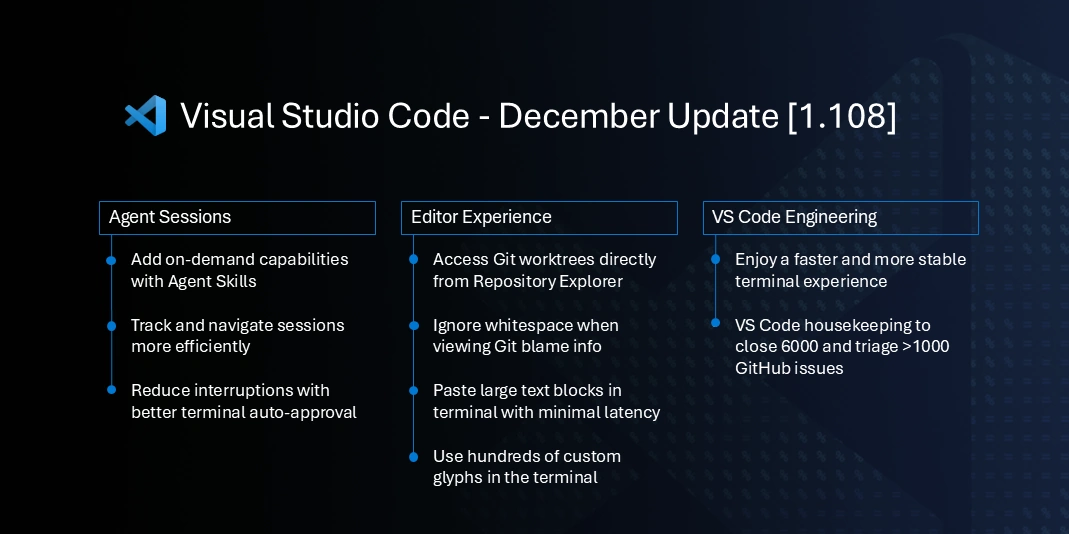
Traditionally, the month of December is a time where our team focuses on cleaning up GitHub issues and pull requests across our repositories. This year, we managed to reduce our open issues by nearly 6,000 and triaged over a thousand more.
In addition to our housekeeping efforts, we have also made several improvements and feature updates across various areas of VS Code.
Happy Coding!
v1.107.1: November 2025 Recovery 1
The update addresses these issues.
For the complete release notes go to Updates on code.visualstudio.com.
v1.107.0: November 2025
Welcome to the November 2025 release of Visual Studio Code. There are many updates in this version that we hope you'll like, some of the key highlights include:
VS Code now includes Agent HQ, background agents and custom agents for your org.
- Agent HQ: You can use GitHub Copilot alongside your other coding agents to complete multiple tasks. Leverage background, cloud, or local agents and their relative strengths for the right job, all at the same time.
- Background agents work in their own isolated workspaces, managed for you by VS Code.
- Custom agents for organizations: Your team can now share custom agents at the org level.

v1.106.3: October 2025 Recovery 3
The update addresses these issues.
For the complete release notes go to Updates on code.visualstudio.com.
v1.106.2: October 2025 Recovery 2
The update addresses these issues.
For the complete release notes go to Updates on code.visualstudio.com.
v1.106.1: October 2025 Recovery 1
The update addresses these issues.
For the complete release notes go to Updates on code.visualstudio.com.
v1.106.0: October 2025
Welcome to the October 2025 release of Visual Studio Code. There are many updates in this version that we hope you'll like, some of the key highlights include:
| AI | Productivity and UX | Enterprise |
|---|---|---|
| Plan complex coding tasks with the plan agent and monitor agent sessions across background agents Show more |
Select text from deleted code in the diff editor Show more |
Manage MCP server access with custom MCP registry Show more |
| Inline suggestions are now open source Show more |
Experience the more modern, refreshed product icons Show more |
Manage Linux devices with JSON policies Show more |
v1.105.1: September 2025 Recovery 1
The update addresses these issues.
For the complete release notes go to Updates on code.visualstudio.com.
v1.105.0: September 2025
Welcome to the September 2025 release of Visual Studio Code. There are many updates in this version that we hope you'll like, some of the key highlights include:
| OS integration | Developer productivity | Agent tools |
|---|---|---|
| Get notified about task completion and chat responses Show more |
Resolve merge conflicts with AI assistance Show more |
Install MCP servers from the MCP marketplace Show more |
| Native authentication experience on macOS Show more |
Pick up where you left off with the recent chats Show more |
Use fully-qualified tool names to avoid conflicts Show more |
v1.104.3: August 2025 Recovery 3
The update addresses these issues.
v1.104.2: August 2025 Recovery 2
The update addresses these issues.
v1.104.1: August 2025 Recovery 1
The update addresses these issues.
v1.104.0: August 2025
Welcome to the August 2025 release of Visual Studio Code. There are many updates in this version that we hope you'll like, some of the key highlights include:
| Model flexibility | Security | Productivity |
|---|---|---|
| Let VS Code select the best model Show more |
Confirm edits for sensitive files Show more |
Remove distractions from chat file edits Show more |
| Contribute models through VS Code extensions Show more |
Let agents run terminal commands safely Show more |
Use AGENTS.md to add chat context Show more |
v1.103.2: July 2025 Recovery 2
The update addresses these issues.
v1.103.1: July 2025 Recovery 1
The update adds GPT-5 prompt improvements, support for GPT-5 mini, and addresses these issues.
v1.103.0: July 2025
Welcome to the July 2025 release of Visual Studio Code. There are many updates in this version that we hope you'll like, some of the key highlights include:
| MCP | Chat | Productivity |
|---|---|---|
| Revamped tool picker experience Show more |
Use GPT-5 in VS Code Show more |
Check out multiple branches simultaneously with Git worktrees Show more |
| Enable more than 128 tools per agent request Show more |
Restore to a previous good state with chat checkpoints Show more |
Manage coding agent sessions in a dedicated view Show more |
v1.102.3: June 2025 Recovery 3
The update addresses these issues.
For the complete release notes go to Updates on code.visualstudio.com.
v1.102.2: June 2025 Recovery 2
The update addresses these issues.
For the complete release notes go to Updates on code.visualstudio.com.
v1.102.1: June 2025 Recovery 1
The update addresses these issues.
For the complete release notes go to Updates on code.visualstudio.com.
v1.102.0: June 2025
Welcome to the June 2025 release of Visual Studio Code. There are many updates in this version that we hope you'll like, some of the key highlights include:
Chat
- Explore and contribute to the open sourced GitHub Copilot Chat extension (Read our blog post).
- Generate custom instructions that reflect your project's conventions (Show more).
- Use custom modes to tailor chat for tasks like planning or research (Show more).
- Automatically approve selected terminal commands (Show more).
- Edit and resubmit previous chat requests (Show more).
MCP
- MCP support is now generally available in VS Code (Show more).
- Easily install and manage MCP servers with the MCP view and gallery (Show more).
- MCP servers as first-class resources in profiles and Settings Sync (Show more).
Editor experience
- Delegate tasks to Copilot coding agent and let it handle them in the background (Show more).
- Scroll the editor on middle click (Show more). If you'd like to read these release notes online, go to Updates on code.visualstudio.com. Insiders: Want to try new features as soon as possible? You can download the nightly Insiders build and try the latest updates as soon as they are available.
v1.101.2: May 2025 Recovery 2
The update addresses these issues.
For the complete release notes go to Updates on code.visualstudio.com.
v1.101.1: May 2025 Recovery 1
The update addresses these issues.
For the complete release notes go to Updates on code.visualstudio.com.
v1.101.0: May 2025
Welcome to the May 2025 release of Visual Studio Code. There are many updates in this version that we hope you'll like, some of the key highlights include:
MCP
- Expand your agent coding flow with support for prompts, resources, and sampling (Show more).
- Access MCP servers that require authentication (Show more).
- Debug MCP servers with development mode (Show more).
- Publish MCP servers from an extension (Show more).
Chat
- Group and manage related tools by combining them in a tool set (Show more).
Source Control
- View files in Source Control Graph view (Show more).
- Assign and track work for GitHub Copilot Coding Agent from within VS Code (Show more).
If you'd like to read these release notes online, go to Updates on code.visualstudio.com.
Want to try new features as soon as possible? You can download the nightly Insiders build and try the latest updates as soon as they are available.
v1.100.3: April 2025 Recovery 3
The update addresses these issues, including a fix for a security vulnerability.
For the complete release notes go to Updates on code.visualstudio.com.
v1.100.2: April 2025 Recovery 2
The update addresses these issues, including a fix for a security vulnerability.
For the complete release notes go to Updates on code.visualstudio.com.
v1.100.1: April 2025 Recovery 1
The update addresses these issues, including a fix for a security vulnerability.
For the complete release notes go to Updates on code.visualstudio.com.
v1.100.0: April 2025
Welcome to the April 2025 release of Visual Studio Code. There are many updates in this version that we hope you'll like, some of the key highlights include:
Chat
Chat performance
Editor experience
For the complete release notes go to Updates on code.visualstudio.com.
Insiders: Want to try new features as soon as possible? You can download the nightly Insiders build and try the latest updates as soon as they are available.
v1.99.3: March 2025 Recovery 3
The update addresses these issues.
For the complete release notes go to Updates on code.visualstudio.com.
v1.99.2: March 2025 Recovery 2
The update addresses these issues.
For the complete release notes go to Updates on code.visualstudio.com.
v1.99.1: March 2025 Recovery 1
The update has a fix for the security vulnerability in this issue.
For the complete release notes go to Updates on code.visualstudio.com.
v1.99.0: March 2025
Welcome to the March 2025 release of Visual Studio Code. There are many updates in this version that we hope you'll like, some of the key highlights include:
Agent mode
Code editing
Chat
Notebook editing
- Create and edit notebooks as easily as code files with support for edit and agent mode (more...).
For the complete release notes go to Updates on code.visualstudio.com.
Insiders: Want to try new features as soon as possible? You can download the nightly Insiders build and try the latest updates as soon as they are available.
v1.98.2: February 2025 Recovery 2
The update addresses these issues.
For the complete release notes go to Updates on code.visualstudio.com.
v1.98.1: February 2025 Recovery 1
The update addresses these issues.
For the complete release notes go to Updates on code.visualstudio.com.
v1.98.0: February 2025
Welcome to the February 2025 release of Visual Studio Code. There are many updates in this version that we hope you'll like, some of the key highlights include:
- Next Edit Suggestions (preview) - Copilot predicts the next edit you are likely to make.
- Agent mode (preview) - Copilot autonomously completes tasks.
- Copilot Edits for notebooks - Iterate quickly on edits for your notebooks.
- Code search - Let Copilot find relevant files for your chat prompt.
- Terminal IntelliSense (preview) - Rich completion support for your terminal.
- Drag & drop references - Quickly open peek references in a new editor.
- Linux custom title bar - Custom title bar support for Linux enabled by default.
- Unresolved diagnostics (preview) - Prompt when committing with unresolved diagnostics.
- Soft-delete in source control - Move untracked files to trash instead of deleting them.
- Custom instructions GA - Use custom instructions to tailor Copilot to your needs.
For the complete release notes go to Updates on code.visualstudio.com.
Insiders: Want to see new features as soon as possible? You can download the nightly Insiders build and try the latest updates as soon as they are available. And for the latest Visual Studio Code news, updates, and content, follow us on Bluesky vscode.dev or Twitter @code!
v1.97.2: January 2025 Recovery 2
The update addresses these issues.
For the complete release notes go to Updates on code.visualstudio.com.
v1.97.1: January 2025 Recovery 1
The update addresses these issues, including a fix for a security vulnerability.
For the complete release notes go to Updates on code.visualstudio.com.
v1.97.0: January 2025
Welcome to the January 2025 release of Visual Studio Code. There are many updates in this version that we hope you'll like, some of the key highlights include:
- Next Edit Suggestions (preview) - Copilot predicts the next edit you are likely to make.
- Reposition Command Palette - Drag the Command Palette and Quick Inputs to a new position.
- Auto accept edits - Automatically accept edits from Copilot after a configurable timeout.
- Extension publisher trust - Keep your environment secure with extension publisher trust.
- Compound logs - Combine multiple logs into a single, aggregated log view.
- Filter output logs - Filter the contents of the Output panel.
- Git blame information - Rich git blame information and open on GitHub.
- Search values in debug variables - Filter and search for specific values in debug variables.
- Notebook inline values - View inline values for code cell variables in notebooks.
- Python no-config debug - Quickly debug a Python script or module without setup.
For the complete release notes go to Updates on code.visualstudio.com.
Insiders: Want to see new features as soon as possible? You can download the nightly Insiders build and try the latest updates as soon as they are available. And for the latest Visual Studio Code news, updates, and content, follow us on Bluesky vscode.dev or Twitter @code!
v1.96.4: November 2024 Recovery 4
The update addresses these issues.
For the complete release notes go to Updates on code.visualstudio.com.
v1.96.3: November 2024 Recovery 3
The update addresses these issues.
For the complete release notes go to Updates on code.visualstudio.com.
v1.96.2: November 2024 Recovery 2
The update addresses these issues.
For the complete release notes go to Updates on code.visualstudio.com.
v1.96.1: November 2024 Recovery 1
The update addresses these issues.
For the complete release notes go to Updates on code.visualstudio.com.
v1.96.0: November 2024
Welcome to the November 2024 release of Visual Studio Code. There are many updates in this version that we hope you'll like, some of the key highlights include:
- Overtype mode - Switch between overwrite or insert mode in the editor
- Add imports on paste - Automatically add missing TS/JS imports when pasting code
- Test coverage - Quickly filter which code is covered by a specific test
- Move views - Easily move views between the Primary and Secondary Side Bar
- Terminal ligatures - Use ligatures in the terminal
- Extension allow list - Configure which extensions can be installed in your organization
- Debug with Copilot - Use copilot-debug terminal command to start a debugging session
- Chat context - Add symbols and folders as context for Chat and Edits
- Move from chat to Copilot Edits - Switch to Copilot Edits to apply code suggestions from Chat
For the complete release notes go to Updates on code.visualstudio.com.
Insiders: Want to see new features as soon as possible? You can download the nightly Insiders build and try the latest updates as soon as they are available. And for the latest Visual Studio Code news, updates, and content, follow us on Twitter @code!
v1.95.3: October 2024 Recovery 3
The update addresses these issues.
For the complete release notes go to Updates on code.visualstudio.com.
v1.95.2: October 2024 Recovery 2
The update addresses these issues.
For the complete release notes go to Updates on code.visualstudio.com.
v1.95.1: October 2024 Recovery 1
The update addresses these issues.
For the complete release notes go to Updates on code.visualstudio.com.
v1.95.0: October 2024
Welcome to the October 2024 release of Visual Studio Code. There are many updates in this version that we hope you'll like, some of the key highlights include:
- Copilot Edits - Iterate quickly on large changes across multiple files.
- Copilot Chat in Secondary Side Bar - Keep Copilot Chat open and ready to-go while you work.
- Multiple GitHub accounts - Log in to multiple GitHub accounts in VS Code simultaneously.
- Copilot code reviews - Get a quick review pass or a deeper review of uncommitted changes.
- Docstrings with Pylance - Generate docstring templates for classes or methods.
- Preview settings indicator - View experimental and preview settings in the Settings editor.
- Copilot extensibility - Showcasing Copilot extensibility in VS Code.
If you'd like to read these release notes online, go to Updates on code.visualstudio.com. Insiders: Want to try new features as soon as possible? You can download the nightly Insiders build
Configuration
📅 Schedule: Branch creation - At any time (no schedule defined), Automerge - At any time (no schedule defined).
🚦 Automerge: Disabled by config. Please merge this manually once you are satisfied.
♻ Rebasing: Whenever PR becomes conflicted, or you tick the rebase/retry checkbox.
👻 Immortal: This PR will be recreated if closed unmerged. Get config help if that's undesired.
- If you want to rebase/retry this PR, check this box
This PR was generated by Mend Renovate. View the repository job log.